/
Using Parcel Lookup
Using Parcel Lookup
- Michelle Cabaya (Unlicensed)
Owned by Michelle Cabaya (Unlicensed)
May 13, 2022
Analytics
Loading data...
Using Parcel Lookup allows you to search for a parcel in the system and view details about it.
Step-by-step guide from the Home screen
From the Work screen, select Parcel Lookup.

- If your device has a camera, the camera scanner is displayed.
Center the camera over a barcode and the camera scanner quickly scans the barcode. Use the light or zoom buttons displayed in the camera scanner if you need more detail.


Step-by-step guide from the pull-out menu
From any screen select the pull-out Menu icon located in the top-left corner of the app.
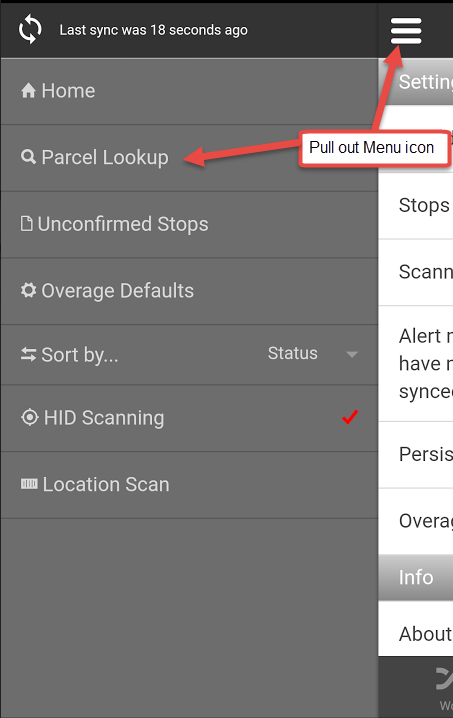
- Select Parcel Lookup.
- If your device has a camera, the camera scanner is displayed.
- Center the camera over a barcode and the camera scanner quickly scans the barcode. Use the light or zoom buttons displayed in the camera scanner if you need more detail.
Related articles
Filter by label
There are no items with the selected labels at this time.
, multiple selections available,
Related content
Using Parcel Lookup
Using Parcel Lookup
More like this
Parcel Lookup
Parcel Lookup
More like this
Parcel Lookup in the Driver App
Parcel Lookup in the Driver App
More like this
Parcels
Parcels
More like this
Parcels in the Driver App
Parcels in the Driver App
More like this
Receiving
Receiving
More like this